
How to access Customers
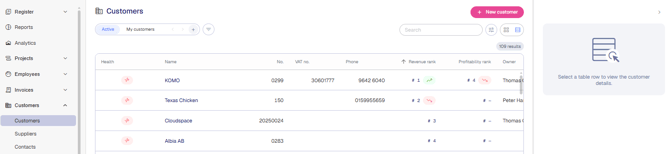
In the main navigation, click Customers → Customers. You'll land on an overview of every customer you have access to.
Understanding revenue and profitability ranking
Two columns rank customers relative to each other:
- Revenue rank — where a customer stands by revenue over the last 12 months, with a trend arrow showing whether it's climbing, holding steady, or falling over the last 30 days.
- Profitability rank — where a customer stands by profitability, with the same trend indicator.
A dash (–) means the customer doesn't yet have enough data in the period to be ranked.
Profitability is calculated as own work revenue divided by the cost of the work.
Rankings are recalculated once a day. "Holding steady" simply means the rank hasn't changed since the last recalculation — it isn't a separate performance measure.
Understanding customer health
Each customer displays a health indicator in the Health column. Health status is a directional signal, not a final verdict — it's calculated automatically from three checks, and these are the only checks that currently feed into it:
- Overdue invoices — the customer has overdue invoices. Next step: balance the invoices to keep the account healthy.
- Old invoice potential — there is billable work older than 30 days. Next step: invoice the customer or correct the invoice dates on the potential.
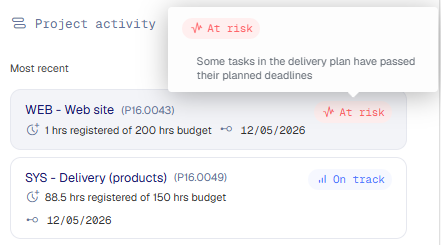
- Projects with bad health — one or more of the customer's projects are at risk. Next step: contact the project manager.
A customer is flagged At risk if any one of these three checks is true. It updates automatically as invoices are paid, potential is invoiced, or project health changes.
Overdue invoice status is a local TimeLog field; for some accounting/ERP integrations, it's kept in sync through that integration. Old invoice potential is strictly internal — it's calculated from billable hours that haven't been invoiced yet and has no connection to the accounting/ERP system.
| ℹ️ Customer health rolls up signals from invoicing and Project Portfolio, so an issue on a single project or a single overdue invoice is enough to flag the whole customer account. |
|---|
The Customer insights panel
Click any customer row to open the side panel on the right. The panel shows:
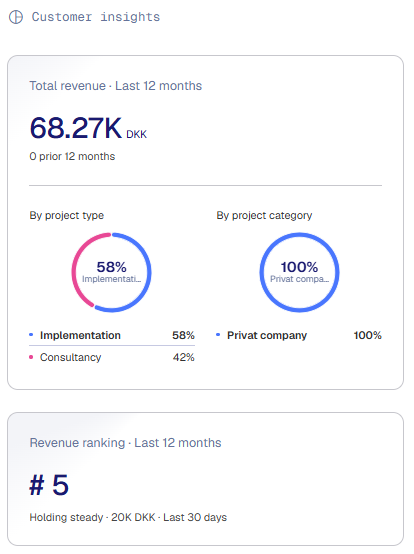
- Customer insights — total revenue over the last 12 months, compared to the prior 12 months, broken down by the dimensions project type and project category.
- Revenue ranking — the customer's position over the last 12 months.
- Customer health — the specific signals driving the current status, each with a recommended next step.
- Project activity — the customer's projects sorted by most recent activity. No other filter is applied, so this list isn't limited to at-risk projects.
The panel updates automatically as hours are logged, invoices are issued, or budgets change.
To close the panel, click the top-right arrow to collapse it, or click another customer row to see insights for a different customer.
Customer Search and Custom Views
Use the Search field in the top-right to find a specific customer in the current shown list. Use the filter icon to narrow results by owner, country, health status, or other criteria. Create and save Custom Views based on your preferred filtering, and share them with colleagues.

Updating multiple customers at once
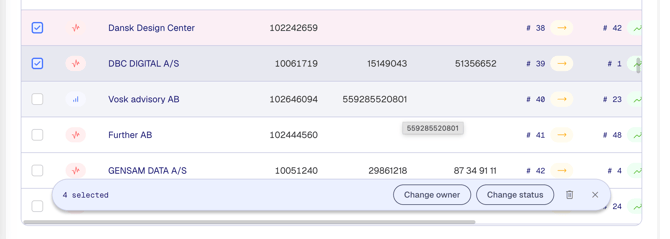
Select the checkboxes next to any customer rows — or the checkbox in the header to select all — to open a toolbar at the bottom of the list. From there you can:
- Change owner — reassign the owner across all selected customers at once.
- Change status — move a batch of customers between statuses (for example, from Client to Partner) in a single action.
- Delete — remove multiple customers at once.
Click the X in the toolbar to clear your selection.
Note: Bulk actions apply immediately and cannot be undone. Double-check your selection before applying a change, especially before deleting.
Good to know
- Health status is a directional signal — it is calculated by TimeLog and cannot be set manually.
- Customers shows all customers you have access to based on your role and privileges.
- The Customer insights panel does not replace the full customer record — click the customer name to open full details.
- Project Category is an optional project dimension that can be activated in the system administration.