
Introduction
The Invoice Fee Configurator makes it very easy to add a fee to your invoices, using simple rules for automating the amount to be added. You can set a fixed or relative amount, either system-wide, per customer, per project or on the invoice draft. It ensures that the invoicing of customers and projects are anchored in the system and does not rely on people to remember when to add invoicing fees to the invoices (ensuring no loss of data) and when to not add invoicing fee to the invoices (avoid wrong invoicing, causing friction with recipient).
Key Concept: Hierarchical Fee Configuration
The invoicing fee system works on a hierarchical principle, allowing you to set up fees at multiple levels:
- System-wide default settings
- Customer-level settings
- Project-level settings
This means you can create highly customized invoicing fee structures that adapt to the unique needs of each customer and project.
The configuration also extends the product number mapping to set the default product number for fee lines in the integration.
Getting Started: Where to Find Invoicing Fee Settings
System Admin Level
- Navigate to: Finance > Invoice Settings
- Here, you'll find the global default settings that can be inherited by customers and projects
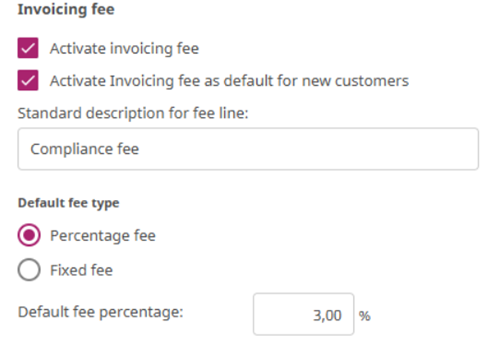
First off, enable the use of invoicing fees.
Decide if invoicing fees are applied as default to all new customers. If so, enable this and configure how the default invoicing fee should be applied.
The standard description for fee lines is the text added to the fee invoice line when invoicing.
Decide if the fee is a percentage fee calculated from the sum of the invoice lines on the invoice or if is a fixed fee applied no matter the amount on the invoice.
Specify what percentage or fixed amount to use as default.
Customer Level
- Go to: Customer Profile > Finance > Invoice Settings
- Set default invoicing fees that will automatically apply to all projects for this customer
- Customize descriptions, percentages, and product numbers
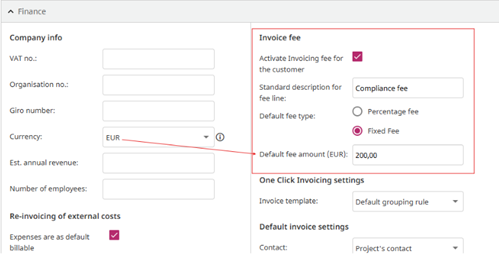
A new customer will by default have the invoicing fee enabled or not, based on the standard configuration.
You can specify (deviate) for the specific customer exactly what the default for this customer should be. Are fees applied or not, what is the standard text, is it percentage or fixed fee and what percentage / fixed amount fee applies.
Project Level 
- Navigate to: Project > Finance > Invoice Settings
- Adjust or override customer-level settings for specific projects
- Allows for project-specific fee structures
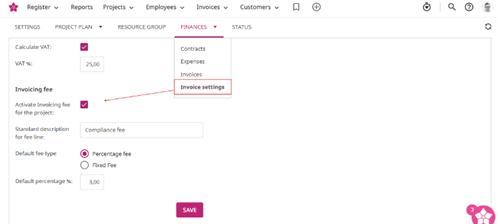
By default, any new project will inherit the invoicing fee setup from the customer setup.
You can specify (deviate) for the specific project exactly what the default for this project should be. Are fees applied or not, what is the standard text, is it percentage or fixed fee and what percentage / fixed amount fee applies.
Default product number for fee invoice lines configuration
The default is configured for each integration separately.
- Navigate to System administration > Integrations and API > Integrations and pick the integration you want to configure
- Pick the tab “Import product numbers”
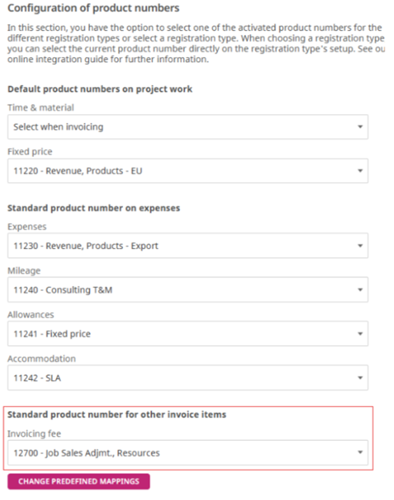
After setting the standard product number for the invoice fee it is possible to push it to all invoice drafts under the integration that has invoice fee lines using the “Change predefined mappings” button.
Functionality on the invoice
When the Invoicing fee feature is enabled a new button “Add invoicing fee” is available in Edit Invoice. Clicking the button will give the user option to add either a Percentage fee or a Fixed Fee. It is possible to add multiple fee lines to one invoice.
The invoicing fee lines will always be sorted as the last lines of the invoice lines and cannot be dragged.
A fee line can be removed manually the same way as any other invoice line.
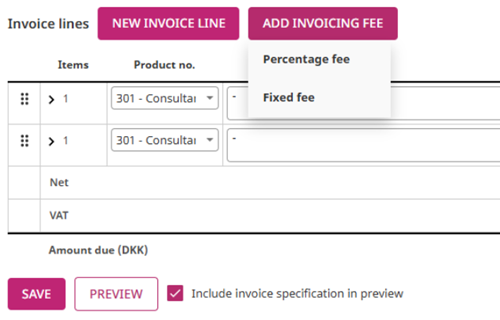
The new fee line will be added based on standard configuration for text and product number setup, but without a predefined percentage or amount. The user must manually set the percentage or amount manually for the invoice after adding the line.
The percentage fee automatically calculates the fee line amount as the sum of other invoice lines time the percentage. Any changes to the invoice lines or the percentage will automatically recalculate the fee amount. 
Fixed fee lines will have the amount the user enters no matter the amount of or changes to the other invoice lines.

Practical Example
Let's walk through a scenario to illustrate the flexibility:
Scenario: Consulting Project for Customer 123
- System Default: 5% administrative fee
- Customer (ACME Corp): 10% project management fee
- Specific Project: 15% for web development consulting
- Specific Contract: 20% for specialized development phase